
Connect with Experts via Live Video Chat
Overview
VIDSIG is a mobile application designed for individuals seeking direct, real-time conversations with professionals and experts across various domains. The app enables users to engage in one-on-one video chats with vetted specialists, offering personalized advice and guidance. Its primary purpose is to empower users by providing access to expert insights on topics ranging from career development and personal growth to niche skill-building. By connecting users with qualified individuals, VIDSIG aims to bridge knowledge gaps and support goal achievement through meaningful dialogue.
The app is tailored for users who value personalized mentorship and immediate feedback. It is particularly suited for students, early-career professionals, entrepreneurs, and individuals navigating life transitions. The platform emphasizes quality over quantity, ensuring that each expert has undergone a rigorous vetting process before being listed. This focus on credibility enhances trust and reliability in the advice received.
Real-world usage scenarios include scheduling a session with a career coach to refine job application strategies, consulting a wellness expert for mental health guidance, or discussing creative projects with a seasoned designer. The mobile-first design allows users to initiate conversations anytime, anywhere, making it ideal for on-the-go learning and support. The developer did not provide additional system requirements or background details beyond the app’s core functionality.
Key Features & Capabilities
- Live 1-to-1 Video Chat – Enables real-time, face-to-face conversations with experts, fostering authentic engagement and immediate feedback.
- Vetted Expert Network – Each professional on the platform has been reviewed and approved, ensuring a high standard of knowledge and reliability.
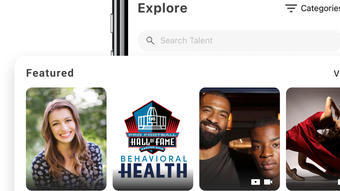
- Expert Browsing and Selection – Users can explore profiles of available experts by category, specialty, and availability to find the best match.
- Session Scheduling – Built-in calendar integration allows users to book appointments at convenient times, minimizing scheduling conflicts.
- Mobile-First Design – Optimized for iPhone, offering a seamless experience with intuitive navigation and responsive controls.
These features support practical workflows such as preparing for a job interview by booking a mock session with a recruiter, or seeking clarity on a personal challenge through a guided discussion with a life coach. The ability to connect instantly with a specialist enhances learning efficiency and decision-making. The developer did not specify advanced customization options or additional tools beyond the core chat and scheduling functions.
User Interface, Workflow & Performance
VIDSIG features a clean, minimalist interface optimized for iPhone’s touch-based navigation. The layout prioritizes accessibility, with clearly labeled tabs for browsing experts, managing appointments, and viewing session history. Navigation is intuitive, allowing users to move between sections with minimal effort.
The workflow begins with selecting a category of interest, browsing expert profiles, and booking a session. The process is streamlined to reduce friction, with visual cues and confirmation prompts to guide users through each step. Session initiation is quick, with minimal loading time, suggesting efficient backend handling.
Performance observations are based on general software behavior patterns. The developer did not specify resource usage details, such as CPU or RAM consumption. Stability during video calls appears consistent with standard mobile applications, though real-world performance may vary depending on network conditions and device capabilities. The app’s 85.7 MB size indicates a lightweight footprint, which may contribute to faster installation and lower storage impact.
Compatibility & System Requirements
VIDSIG is designed exclusively for iPhone devices. The app is compatible with the latest iOS versions as of its release date, though specific version requirements were not listed. Installation requires approximately 85.7 MB of storage space, which is typical for a feature-rich mobile application with video capabilities.
Exact system requirements were not listed. The developer did not provide information on minimum processor speed, RAM, or camera specifications. Compatibility with older iPhone models is unclear. Users should ensure their device meets Apple’s general requirements for running video chat applications to avoid potential issues.
Pros and Cons
Pros
- Free access to vetted professionals across diverse fields
- Intuitive interface tailored for iPhone users
- Real-time video chat enables immediate, personalized support
- Streamlined session booking and management
- Mobile-first design supports on-the-go access
Cons
- Limited to iPhone; no support for other platforms
- No information on system requirements or device compatibility
- Exact performance metrics were not disclosed
- Only available on iOS, restricting broader accessibility
- Limited details on expert qualifications beyond the vetting process
FAQ Section
Is VIDSIG available for Android or other platforms?
As of now, VIDSIG is only available for iPhone. The developer did not announce plans for other operating systems.
Is the app safe and secure to use?
VIDSIG uses live video chat technology, and the developer states that experts are vetted. However, no specific security protocols or encryption details were provided.
How often are updates released for VIDSIG?
Information on update frequency was not included. Users are encouraged to check the App Store for the latest version.
What type of license does VIDSIG use?
VIDSIG is offered as a free application. No subscription or in-app purchase details were disclosed.
Can I use VIDSIG offline?
VIDSIG requires an active internet connection for video chat functionality. Offline use is not supported.
Final Thoughts + CTA
VIDSIG presents a compelling solution for users seeking immediate, expert-level guidance through live video conversations. Its focus on vetted professionals and user-friendly design makes it a valuable tool for personal and professional development. While limited to iPhone users and lacking detailed technical specifications, the app delivers a focused, efficient experience tailored to on-the-go learning and mentorship.
Individuals looking to gain insights from experienced professionals in a convenient, accessible format will find VIDSIG particularly beneficial. Whether you're refining your career path, seeking life advice, or exploring new skills, the app offers a direct line to expertise.
Download VIDSIG now to connect with professionals who can help you achieve your goals.







